Search photos by description by typing what is in the frame, not the file name. On a Mac with Phoaly, the sentence is encoded on the machine and compared with a local index of your photos, so nothing about the image or the query leaves the computer.
This guide covers what to type, what visual search can and cannot know, and how to combine it with dates, people, places, and categories.
How local visual search works
Phoaly builds two things as it scans a folder:
- A vector for each photo, based on what is in the picture.
- A text encoder that turns your sentence into a vector in the same space.
When you search, only the sentence is encoded. The photo vectors are already there. That is why the second search is fast even in a large library, and why the text model can load on demand and be released after five idle minutes.
Search accepts Chinese and English descriptions. The index is built once; each query encodes one sentence.
What to type
Describe the picture the way you would describe it to a person who has not seen it:
- The subject: a kid, a dog, a wedding dress, a bicycle.
- The setting: on a beach, in a city, indoors, at night.
- The light or weather: sunset, fog, snow, neon.
- The composition: close-up, wide shot, from above.
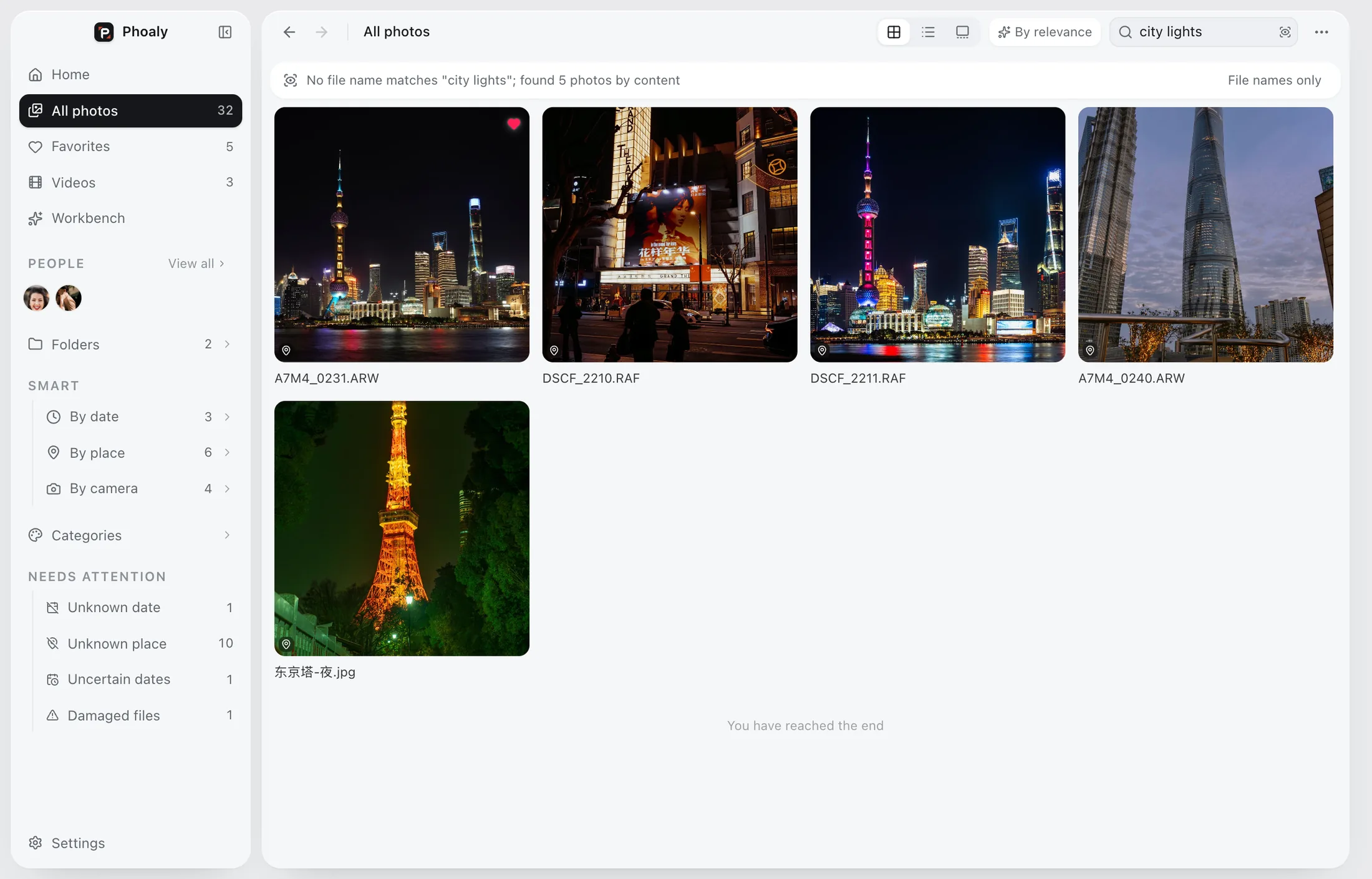
Short phrases work better than full sentences. “City lights” is a better query than “a photo I took last year of the city at night with lights”.
A practical query table
| What you remember | Query to try |
|---|---|
| A mood | sunset by the sea |
| An object | yellow bicycle |
| A setting | narrow street at night |
| A person in context | kid on the grass |
| A celebration | birthday cake |
| A season | snow on trees |
If the first phrase misses, change the noun or the setting. Try “street at night” before “city lights” if the lights are not the main subject.
What visual search cannot know
Visual search matches what the picture looks like. It does not know everything about the file:
- It does not read text inside a photo. Use a text-recognition tool for signs, receipts, and documents.
- It does not know a person's name unless face grouping has assigned one.
- It does not know the story behind the photo.
- It does not replace a RAW editor or a color tool.
For facts that live outside the pixels, use the file name, the folder, the capture date, or the map.
File name search and visual search
Phoaly also searches file names. File name search uses an FTS5 trigram index, so Chinese substrings and fragments from the middle of English names both match.
The two searches answer different questions:
- File name: “Where is IMG_4821?” or “Which folder has the Kyoto files?”
- Visual search: “Which photos look like a sunset by the sea?”
If the file name search finds nothing, Phoaly switches to the picture for that term, once. That prevents a dead end without turning every query into a visual search.
Combine search with grouping
Search is more useful when combined with the other axes:
- Sort by capture time to see the result in order.
- Group by folder to see where the matches live.
- Group by place to narrow a trip.
- Group by camera to separate phone photos from a shoot.
- Filter by category to keep only people, food, nature, or city scenes.
A query plus a group is often faster than a longer query.
Privacy and model lifecycle
The text encoder and the photo vectors run on this Mac. The sentence you type is encoded locally and compared against the local index. It is not sent to a server.
The text model loads on demand and is released after five idle minutes. The photo index is disposable and can be rebuilt from the folders at any time.
Frequently asked questions
Does visual search upload my photos?
No. Photos, thumbnails, vectors, and the query stay on the Mac.
Can I search in Chinese?
Yes. Chinese and English descriptions both work.
Why does a query return nothing?
Try a different noun or setting. Visual search matches appearance, not the story or the file name. If the photo is in a format the index cannot read, rebuild the index and try again.
Does it find text in screenshots?
Visual search is not a text-recognition tool. Use file names or a dedicated OCR tool for text inside images.