The structure that scales on a Mac is date first: a year folder, a month folder, and a day or event folder under that. Add one naming rule for files, one bucket for undated photos, and one rule for external drives. Everything else is detail.
This guide covers a structure you can keep for a decade, the parts that need a decision, and how to move an existing archive without guessing.
Why a folder structure still matters
A folder tree is the one index every app can read. It survives app changes, drive changes, and machine changes. It works in Finder, in a terminal, in a backup tool, and in any photo app you try later.
A structure that is too clever becomes a second job. A structure that is too flat becomes unusable at 50,000 files. The goal is boring and predictable.
The three axes
Every photo archive needs an answer for three things:
- When: the capture date. Every camera records it.
- Where or what: the event, place, client, or project.
- Which copy: original, edit, export, or scan.
Most structures fail because they mix the axes inconsistently. A date-first tree with a short event name handles all three without a database.
A structure that scales
Photos/
  2025/
    2025-03/
      2025-03-14 Kyoto/
        2025-03-14-kyoto-0001.jpg
        2025-03-14-kyoto-0002.jpg
      2025-03-22 Family lunch/
  2026/
    2026-01/
  _Undated/
  _Scans/
  _Exports/
The rules behind it:
- Year at the top, so the tree stays shallow.
- Month as
YYYY-MM, so it sorts correctly. - Day or event as
YYYY-MM-DD Name, so the folder reads well without a number. - Underscore prefixes sort the special folders below the years.
- Exports live outside the original tree, so you can delete them safely.
Naming rules
Pick one file name pattern and keep it. A workable default:
YYYY-MM-DD-short-name-0001.ext
- The date sorts the file even when the folder is moved.
- The short name tells you what the shoot was.
- A sequence keeps bursts in order.
- Lowercase avoids case-sensitivity surprises between drives.
If the original file name carries information you rely on, keep it and add the date as a prefix. Do not rename files just to make them look uniform if the name is the only record of where they came from.
Where undated files go
Screenshots, scans, saved images, and files with broken EXIF all break a date-first tree. Give them a home:
_Undated/for photos with no usable capture date._Scans/for scans and documents._Exports/for anything generated from an original.
The underscore prefix keeps these folders out of the year sequence. When you later find a real date, move the file into the correct year.
External drives
External drives add two questions: the mount point and the folder root.
- Mount each drive at the same path every time. A disconnected drive keeps its place in the sidebar, and reconnecting at the same mount point restores it.
- Keep the same top-level structure on every drive, so a file has one obvious home.
- Do not split one year across two drives unless the split is by project.
- Use the drive label for the archive root, not the volume UUID.
Moving an existing archive
Do not move 80,000 files by hand. Use a plan:
- Back up the archive.
- Pick one year or one drive.
- Build the target tree on paper or in the app.
- Preview every target path before confirming.
- Confirm one batch, verify a few files, then continue.
- Keep the journal until the backup is current.
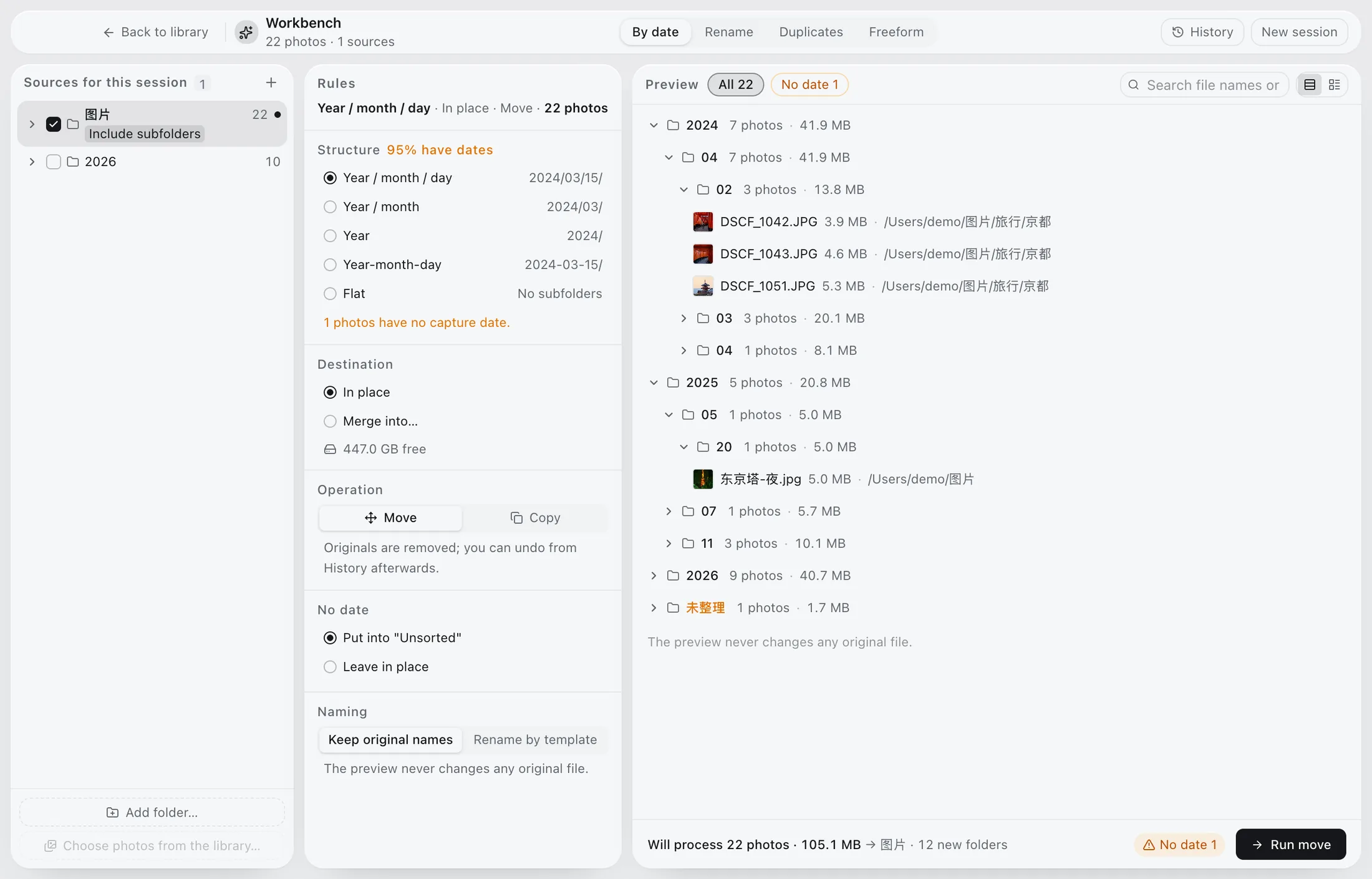
In Phoaly, the workbench does exactly this: a target path per file, a full preview, a journal, and an undo. See the organizing guide for the step-by-step version.
Structures to avoid
- One folder per import. The tree mirrors the import order, not the photos.
- One folder for everything. Finder becomes unusable at scale.
- Deep nesting by camera, lens, and scene. Nobody navigates five levels to find a photo.
- Dates in three formats.
2025-03-14,03-14-2025, and14.03.2025will not sort together. - A separate copy for every app. Two libraries become two archives to maintain.
Frequently asked questions
Should folders be by date or by event?
Use date as the parent and the event as the leaf. That keeps sorting automatic and still lets you read the event name.
What about client work?
Use the client or project as the leaf folder under the date, and keep a consistent prefix. Avoid a separate top-level client tree unless the client is the primary way you search.
How deep should the tree go?
Three or four levels is enough for most archives: year, month, event. Deeper trees slow navigation and make bulk operations harder.
Does Phoaly require a specific structure?
No. It mirrors whatever folder tree you add. The structure in this guide is a recommendation, not a requirement.