Face grouping in Phoaly runs on the Mac: it detects faces in your photos, turns each face into an embedding, clusters similar faces into people, and gives each person a page. Nothing about a face is uploaded, and every grouping can be corrected by hand.
This page explains how the feature works and what it deliberately does not do.
What it does
After a folder is indexed, Phoaly:
- Detects faces in each photo.
- Computes an embedding for every detected face.
- Clusters similar embeddings into person groups.
- Creates a page per person with the photos they appear in.
- Lets you name a person and fix the grouping.
No albums or tags are needed first.
How it works
The pipeline uses three local steps:
- Detection. YuNet finds face regions.
- Embedding. SFace turns each face into a 128-dimensional vector.
- Clustering. HDBSCAN groups similar vectors into people.
All three run on the machine. There is no cloud face database and no account.
Correcting a grouping
Automatic grouping will make mistakes. The app gives four corrections:
- Merge two people that are the same person.
- Split a few faces into a new person.
- Rename a person.
- Assign or remove a face by hand.
A hand-assigned face is locked, so a later re-cluster cannot pull it away. Each of these actions can be undone once.
Where names appear
The same person data appears differently depending on where you look:
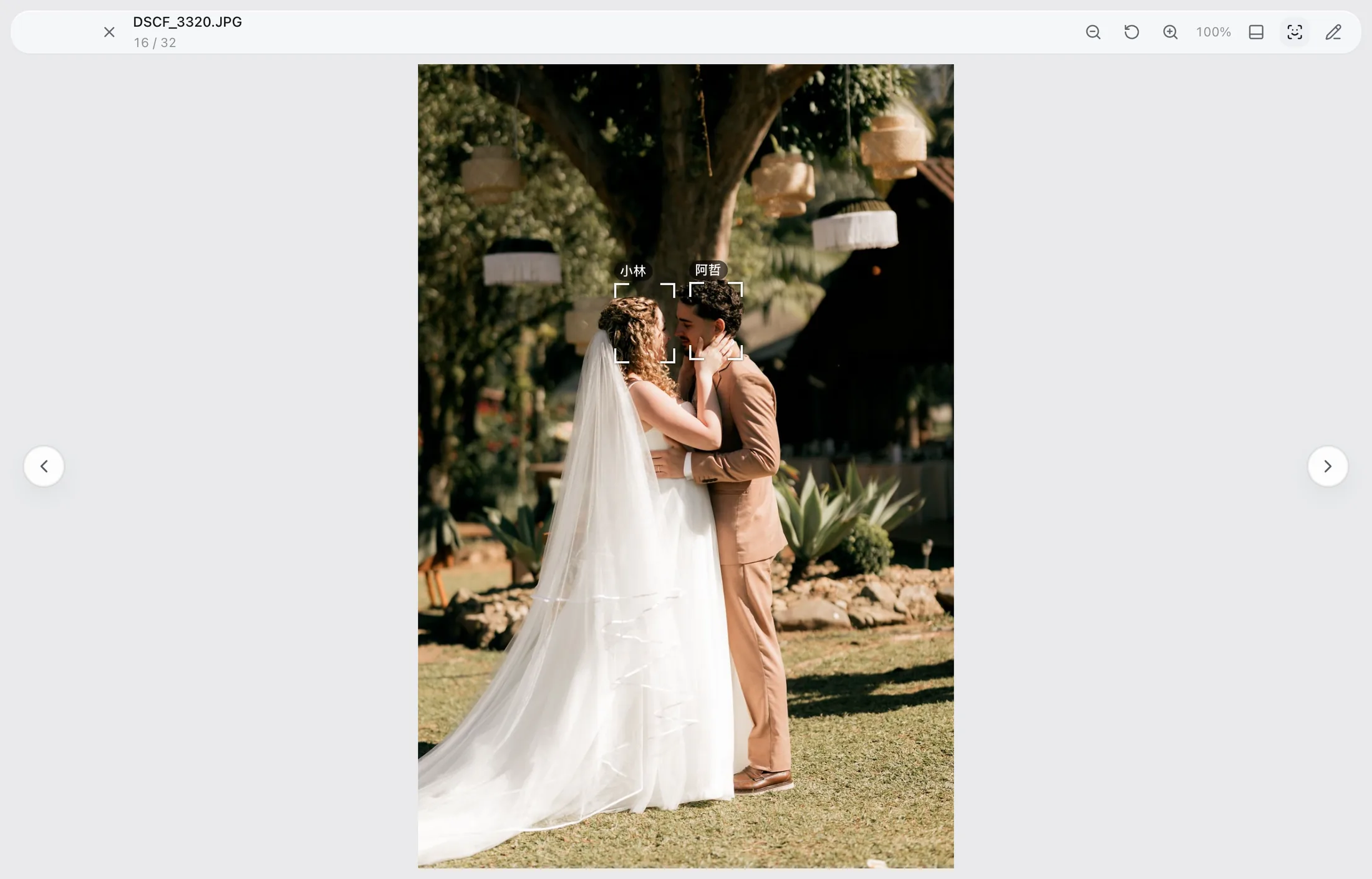
- In the viewer and gallery, face marks and names sit on the photo.
- In the inspector, the marks are drawn without the names.
That keeps the large view readable while the inspector stays compact.
What it does not do
- It does not suggest names from Contacts.
- It does not identify people you have not grouped and named.
- It does not upload face vectors or match them against a remote database.
- It does not infer relationships, ages, or emotions.
The output is a local clustering aid, not an identity system.
Privacy
Face embeddings are computed and stored locally. They are not sent to a server, and the app has no account or cloud sync. Activation sends only the license key, a random device ID, and the app version.
Large libraries
The people view is built on the same indexed data as the rest of the app. A person page shows only the photos that person appears in, and the browser stays usable at the documented 100,000-item library size.
Frequently asked questions
Are faces uploaded for recognition?
No. Detection, embeddings, and clustering run on the Mac.
What happens if a face is grouped wrong?
Merge, split, rename, or assign the face by hand. Manual assignments are locked against later re-clusters.
Can I name a person without confirming every face?
Yes. Name the person and correct only the faces that are wrong. The rest stay in the group.
Does it work on photos without faces?
The rest of the organizer does. Face grouping simply adds nothing to a landscape or a screenshot.