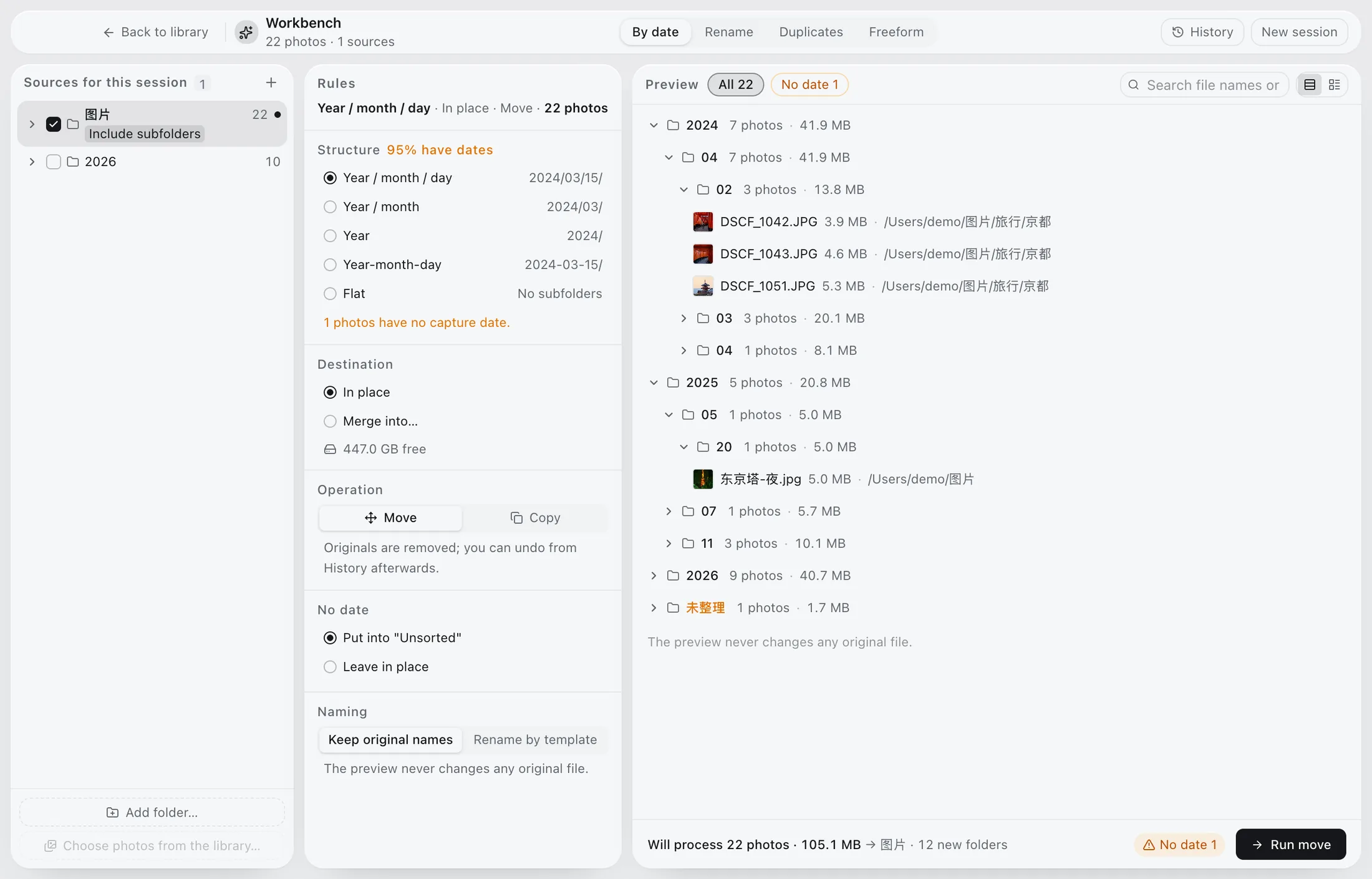
Phoaly's organize workbench follows one sequence: plan, preview, confirm, journal, undo. Rules, rename, dedupe, and freeform moves all use the same preview, so you can see every target path before a single byte changes.
This page explains the model and the safety details. For a step-by-step walkthrough, see the organizing guide.
The problem with batch file operations
Moving and renaming thousands of photos is where archives get damaged:
- A tool moves files before you can see the result.
- Name collisions overwrite one file with another.
- A cross-drive move fails halfway and leaves two partial copies.
- There is no record of what happened, so undo is impossible.
- A disconnected drive turns a planned move into a scattered mess.
The workbench is built around those failure modes.
The workbench model
Every operation follows the same five steps:
- Plan. Choose the rule, target path, name template, or duplicate policy.
- Preview. Inspect the full result, not a sample.
- Confirm. The plan runs as one operation.
- Journal. The session is written to a history.
- Undo. Reverse a single drop or an entire session.
One gesture is one plan. That is what makes undo granular enough to trust.
What the preview shows
A preview is only useful if it answers the questions that cause mistakes:
- The exact target path for every file.
- Which names conflict and how they will be resolved.
- The total size and free space for cross-volume moves.
- Which files will be skipped.
- What the source folder will look like after the move.
If a large number of files land in an unexpected folder, the rule is wrong. Fix the rule before confirming.
The four operations
Rules
Build a target structure such as year, month, and day. Sorting and grouping are independent, so you can sort by capture time and group by folder, date, place, or camera.
Rename
Apply a name template with the capture date and a short name. Conflicts get a suffix instead of overwriting.
Dedupe
Review duplicate groups in the same preview. Keep the copy you want, confirm, and let the rest go to the Trash. The session can be undone.
Freeform
Move files by hand, with the same preview and journal. Number keys can stage a delivery and Enter confirms it.
Safety details
The workbench is conservative on purpose:
- Scanning, browsing, and previewing are read-only.
- Copies are verified with sha256.
- A cross-volume move copies, verifies, then sends the source to the Trash.
- Name conflicts get a suffix instead of overwriting.
- The journal records the session for undo.
- Deletes go to the system Trash, not a permanent erase.
The app does not move files in the background.
Where it fits
Use the workbench when a folder needs a structure, a batch of names needs normalizing, or duplicates need review. Do not use it on every drive at once. One folder or one shoot is enough to learn the preview.
Limits
- No RAW conversion or color editing.
- No cloud sync or multi-user catalog.
- No automatic import or library management.
- No background reorganization.
The workbench acts on the folders you add, and only after you confirm.
Frequently asked questions
Will it move files without asking?
No. A plan runs only after you confirm the preview.
Can I undo a move?
Yes. The journal can reverse a single drop or an entire session.
What happens on a name conflict?
The new file gets a suffix. The existing file is not overwritten.
What happens if a drive disconnects during a move?
Keep the mount point stable and reconnect the drive. The preview states cross-volume size and free space before the move starts, so check those first.