macOS 13+ · Apple silicon · Everything on-device
Your photos are already on your Mac.
Phoaly is a local-first photo organizer for Mac. It reads the folders you already use and understands what is inside them, on this Mac: find a shot with one sentence, group faces and scenes automatically, see the footprint on a map, then reorganize by rule. No import. No upload. No account.
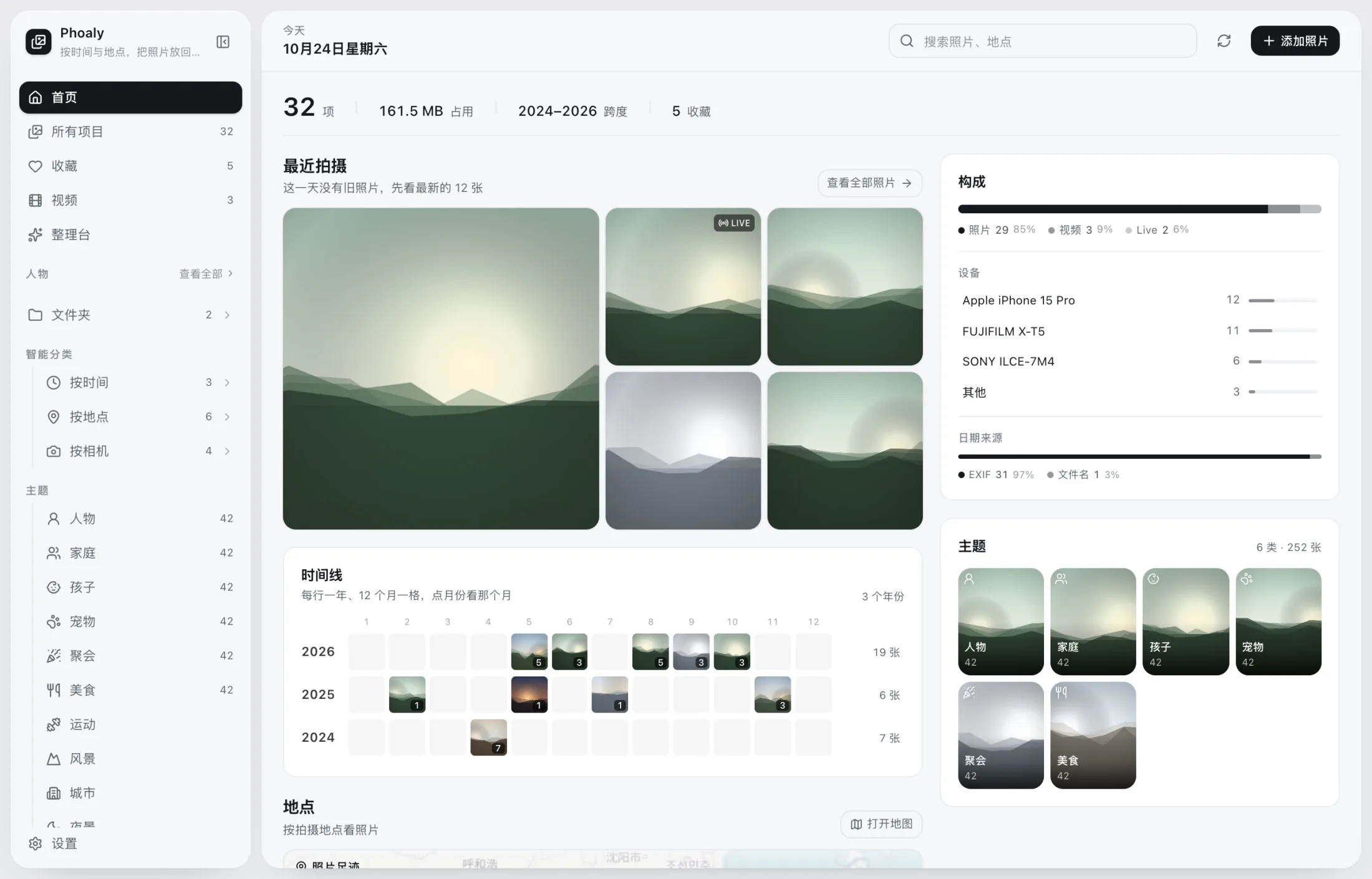
The home screen: recent shots, timeline, places, people, and categories in one view.
- 0uploads
- 0accounts
- 0imports
- 100,000photo benchmark
01 / Visual search
One sentence, one photo.
Type “city lights”, “sunset by the sea”, or “a kid on the grass”. Phoaly searches what is in the picture, not the filename, with no tags to add first. The text encoder and the photo vectors both run on this Mac.
- Chinese and English descriptions work; say what is in the frame
- Photos are indexed once, then each search encodes only that sentence
- If the filename finds nothing, search switches to the picture, once per term
- The text model loads on demand and is released after five idle minutes
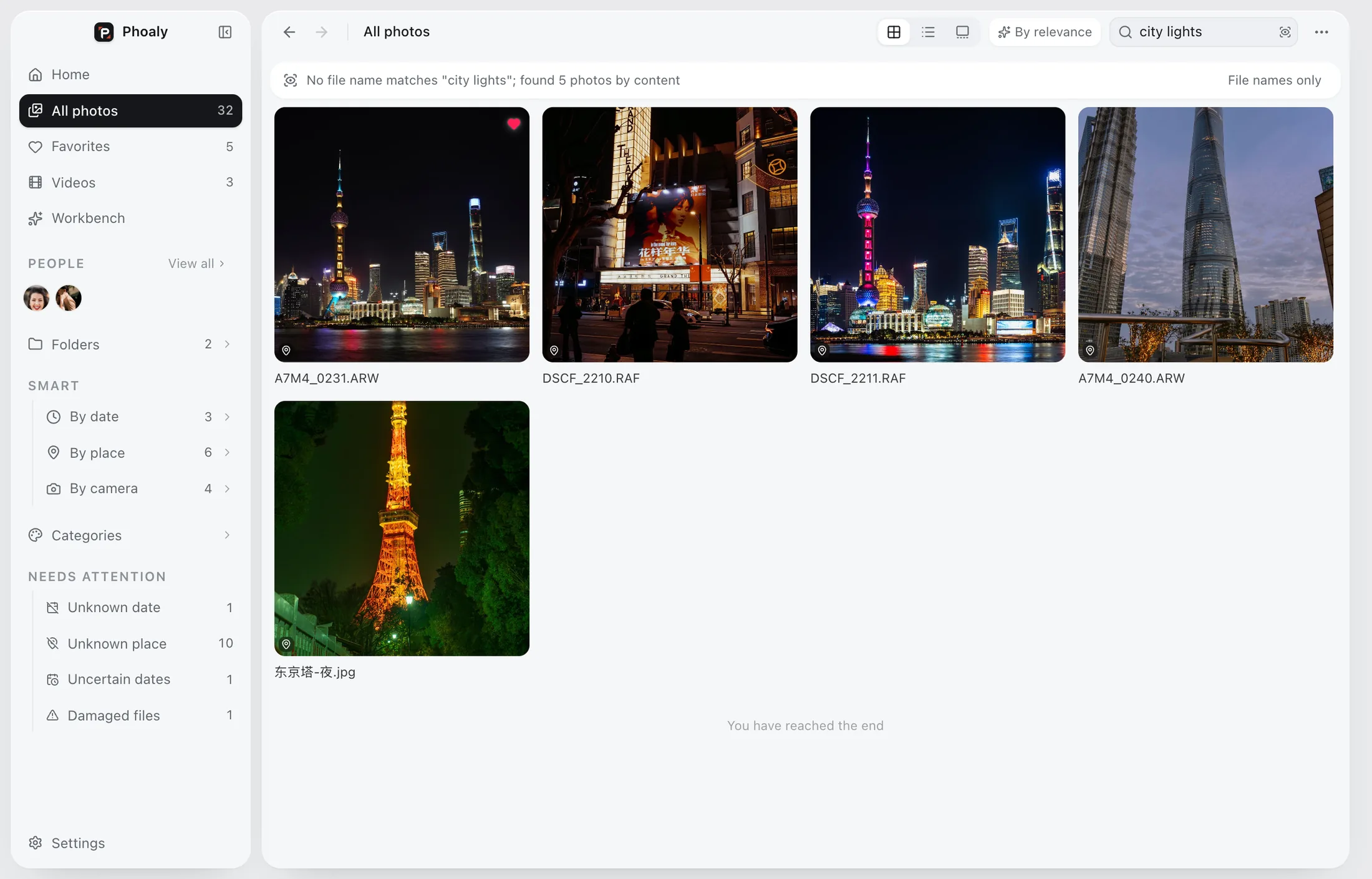
No filename matched “city lights”. Visual search found five photos.
02 / People
It knows who is in the frame.
Face detection, embeddings, and clustering run locally. Each person gets a page with only the photos they appear in; wrong groupings can be merged, split, renamed, or fixed by assigning a face by hand.
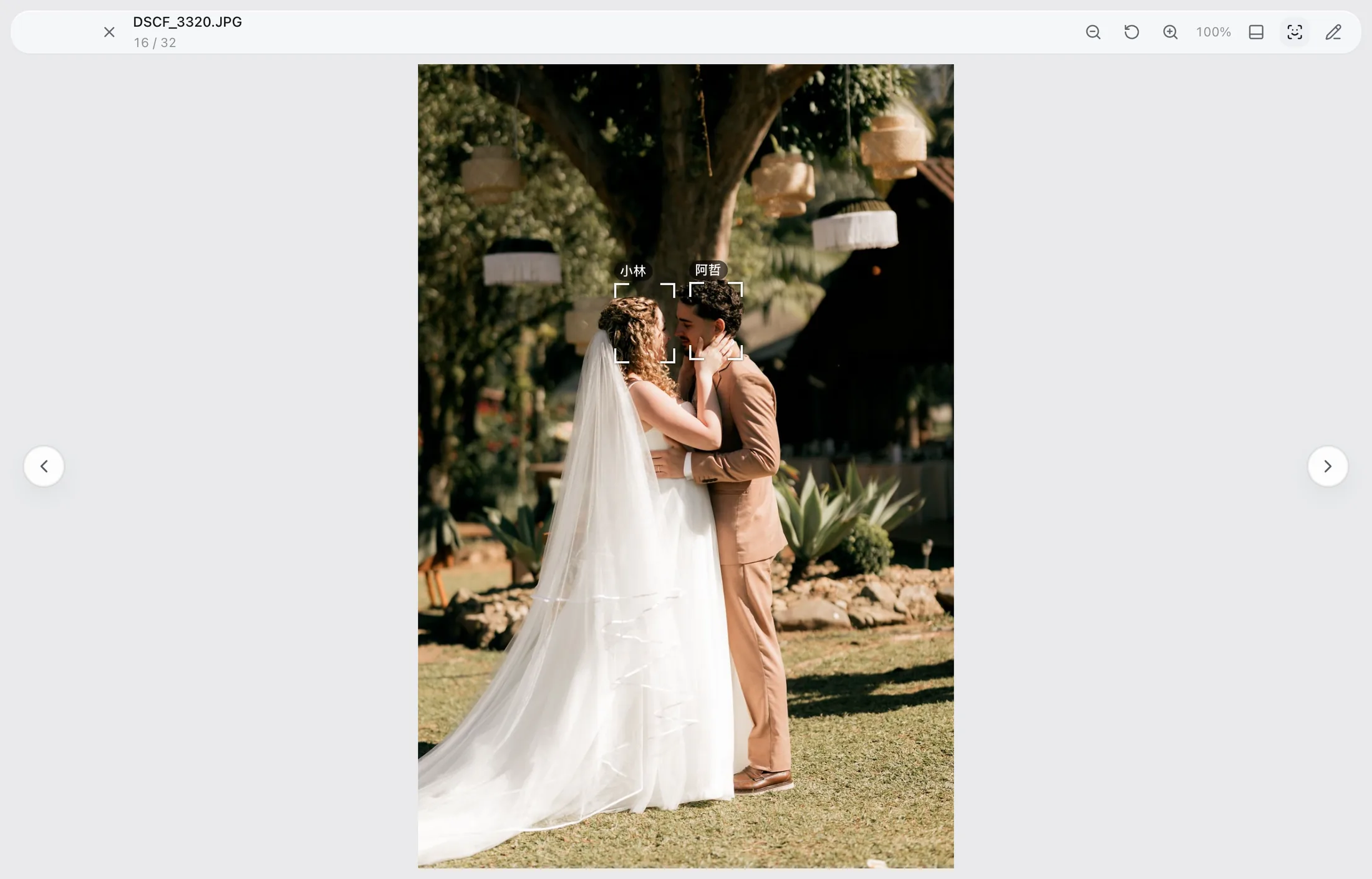
In the viewer, face marks and names sit on the photo. Click a name to open that person.
- YuNet + SFace detection with 128-d embeddings, clustered by HDBSCAN
- The viewer and gallery put marks and names on the photo; the inspector draws the marks only
- A hand-assigned face is locked, so a re-cluster cannot pull it away
- Merge, split, rename, and assign can each be undone once
03 / Categories
Twelve scenes, already sorted.
One visual pass yields both category scores and search vectors. Three groups cover people and pets, daily life, and scenery and cities. A photo can belong to more than one category, and no albums have to be built first.
- People, group photo, kids, pets, food, celebrations, sports, indoors, nature, city, street, night
- Multi-label scores, so one photo can land in several categories
- Category and search indexes share the same pass over each photo
- A category with no photos shows no count, not an empty shell
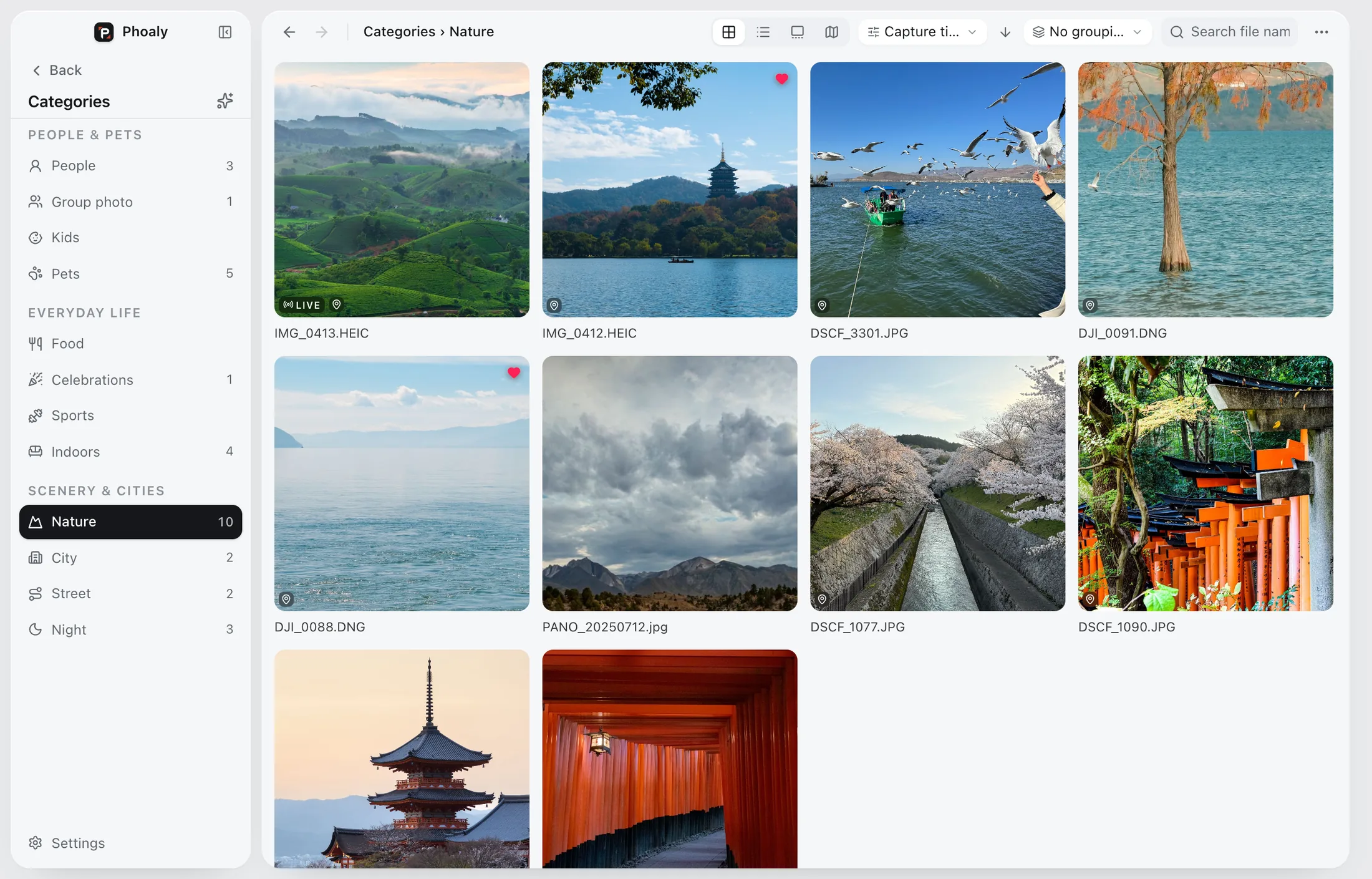
Categories: three groups and twelve scenes, with a cover and a count for each.
04 / Map
See where the photos were taken.
GPS from EXIF becomes a point on the map, clustered by viewport and zoom. The home footprint, the browser map, and the inspector map share one basemap; place names come from an offline gazetteer, Chinese first.
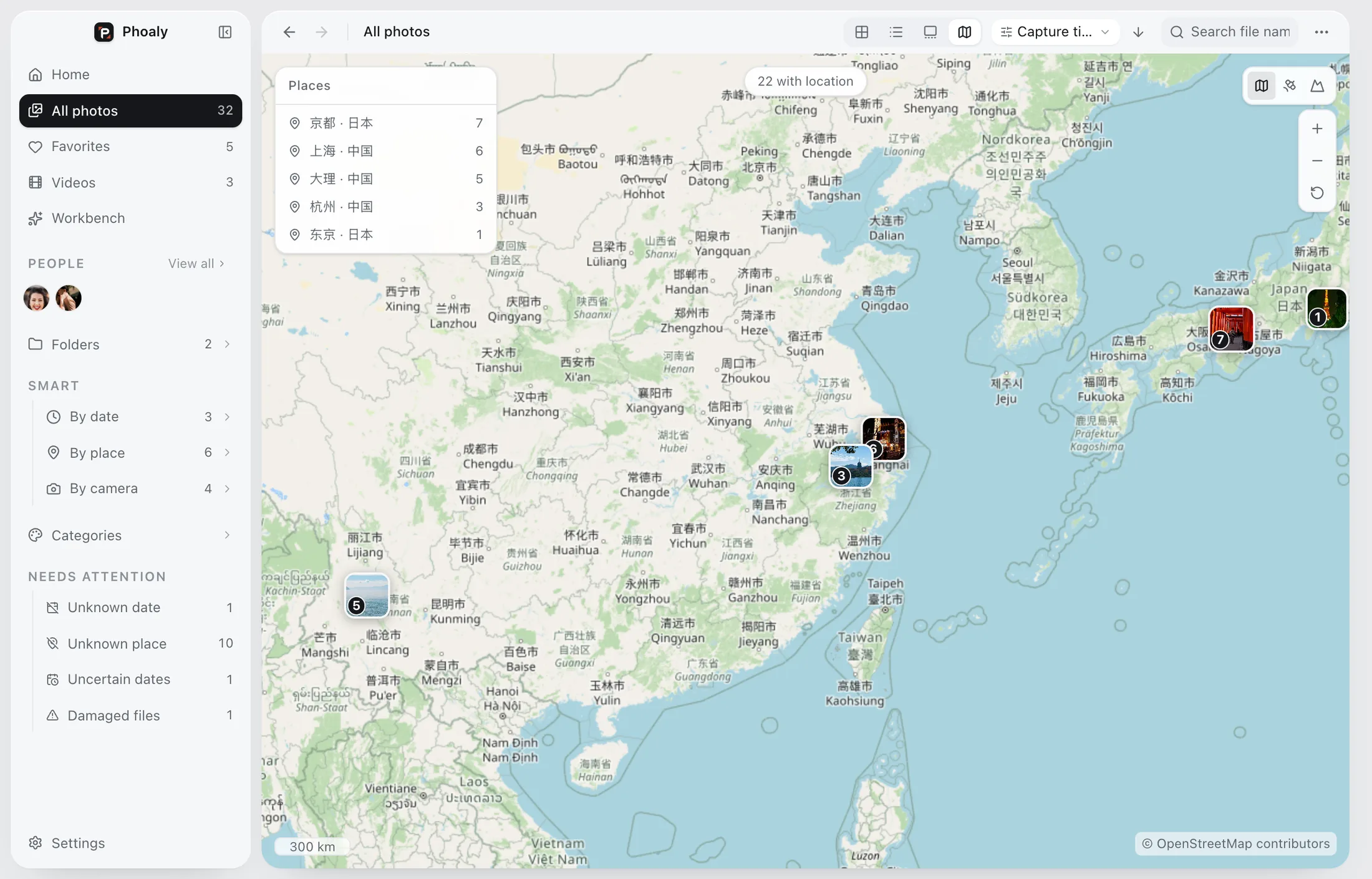
Map: clusters by viewport, with the places and counts listed on the left.
- Clusters follow the zoom, so 100,000 photos never collapse into one blob
- An offline gazetteer of 171,654 places names the city without a network
- Online tiles can be switched off; failures fall back to bundled borders
- The inspector map keeps its zoom when you change photos
05 / Workbench
Preview first. Then move.
Rules, rename, dedupe, and freeform share one preview, one journal, and one undo. Target paths, name conflicts, cross-volume size, and free space are all stated before anything runs. Until you confirm, not one byte on disk changes.
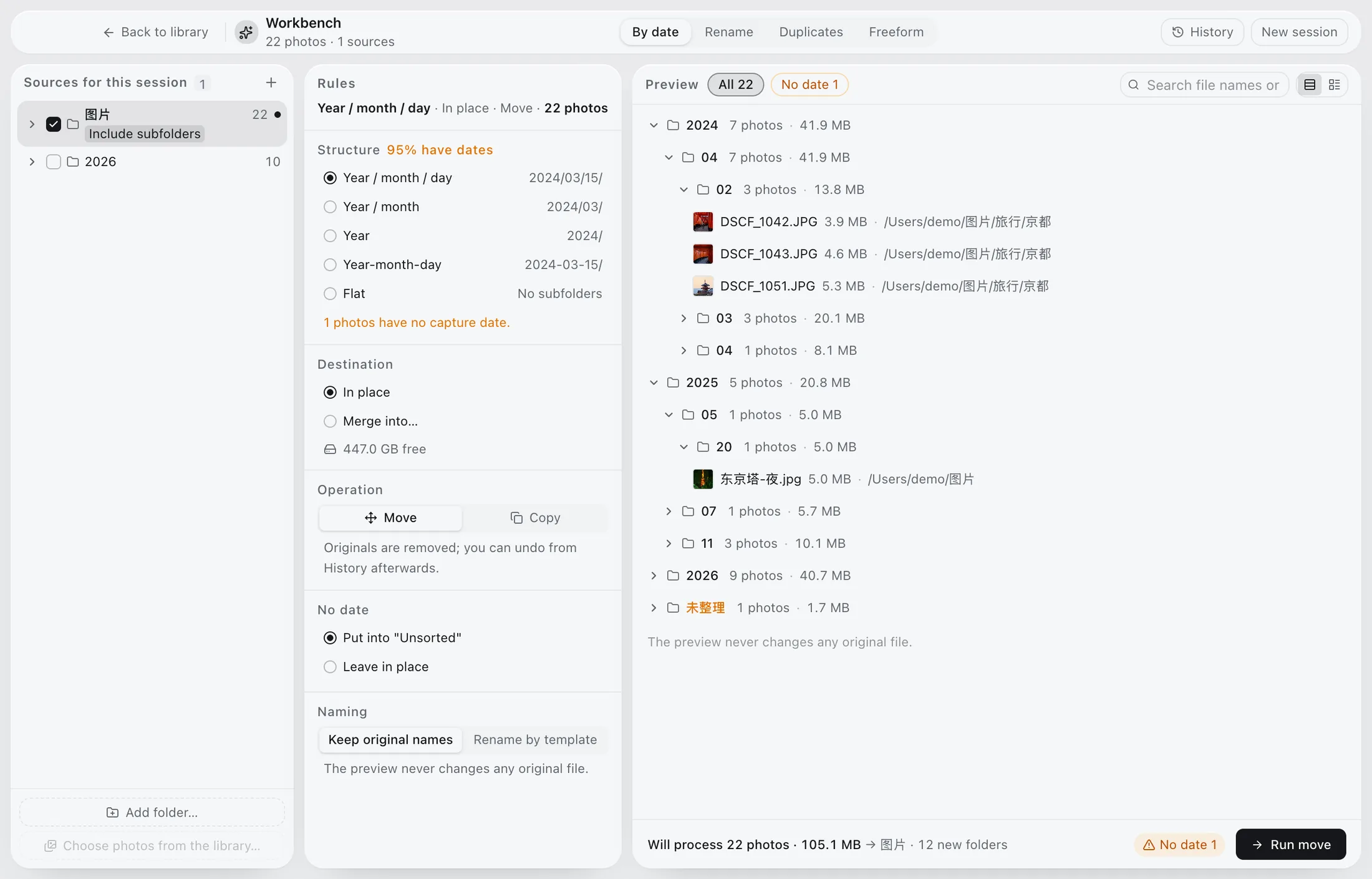
The workbench: rules, targets, actions, and a full preview. Nothing changes before you confirm.
- Year / month / day structure, name template, and the undated policy, each selectable
- Freeform moves on drop; number keys 1–9 stage a delivery for Enter to confirm
- One gesture is one plan: undo a single drop, or a whole session from history
- Copies are verified with sha256; cross-volume moves copy first, then trash the source
06 / Cull
Look first, delete later.
Keep, maybe, reject: one key each, shared by grid, list, gallery, and the full-screen viewer. Marking advances to the next photo, progress counts the whole scope, and deletes go to the system Trash with an undo.
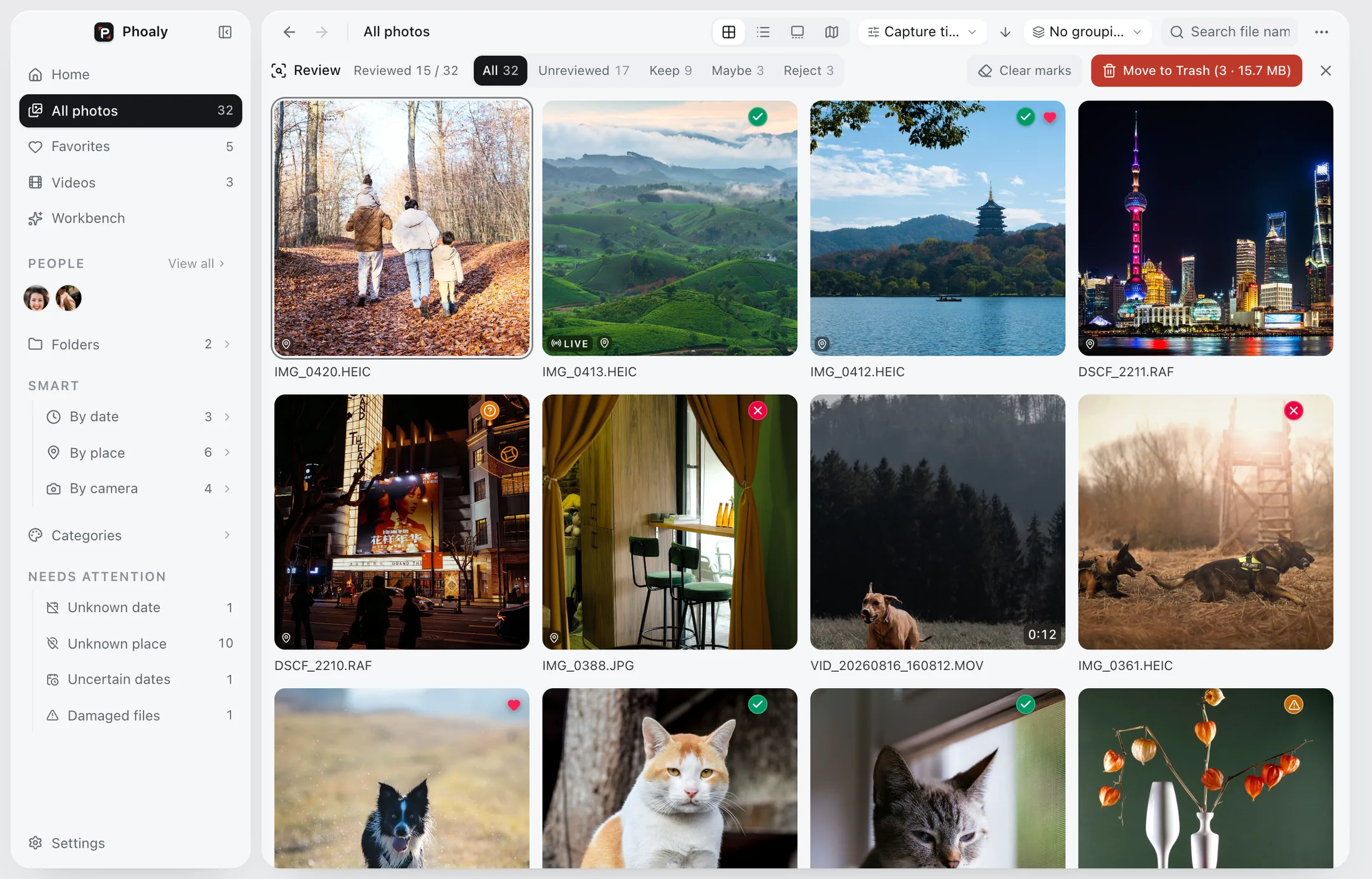
The cull bar: green keeps, amber maybes, red rejects. Filter any time.
Original files are sacred.Browsing, scanning, and preview never write to or move your photos. The only exception is a rotate/crop write-back you explicitly confirm.
07 / Browse
No library. Just your folders.
The sidebar is your Finder tree; photos stay where they are. Grid for the overview, list for the details, gallery for the image, map for the footprint. Sorting and grouping are independent: sort by capture time, then group by folder, date, place, or camera.
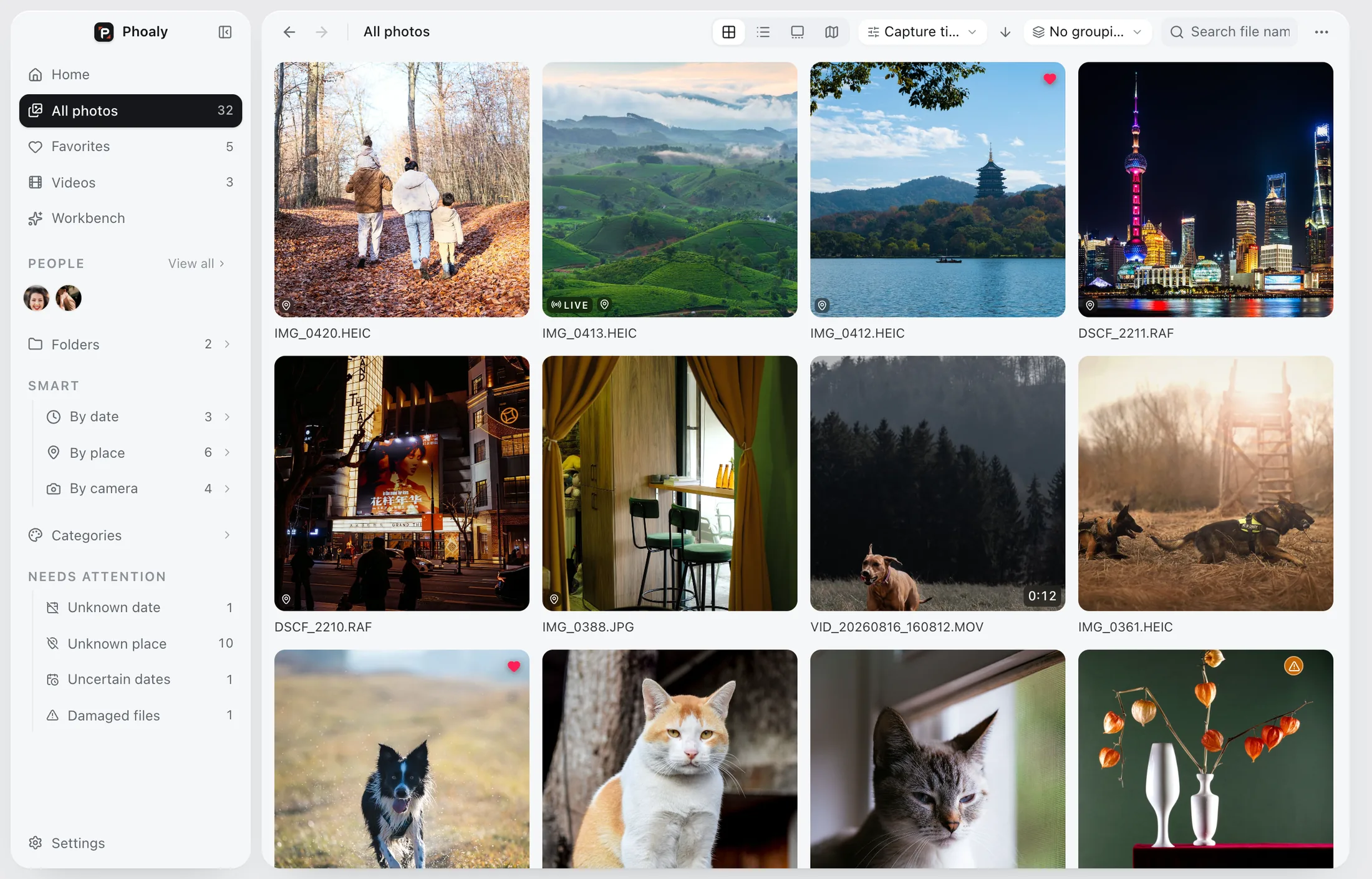
Grid view: folder tree, photos and videos together, grouped by day.
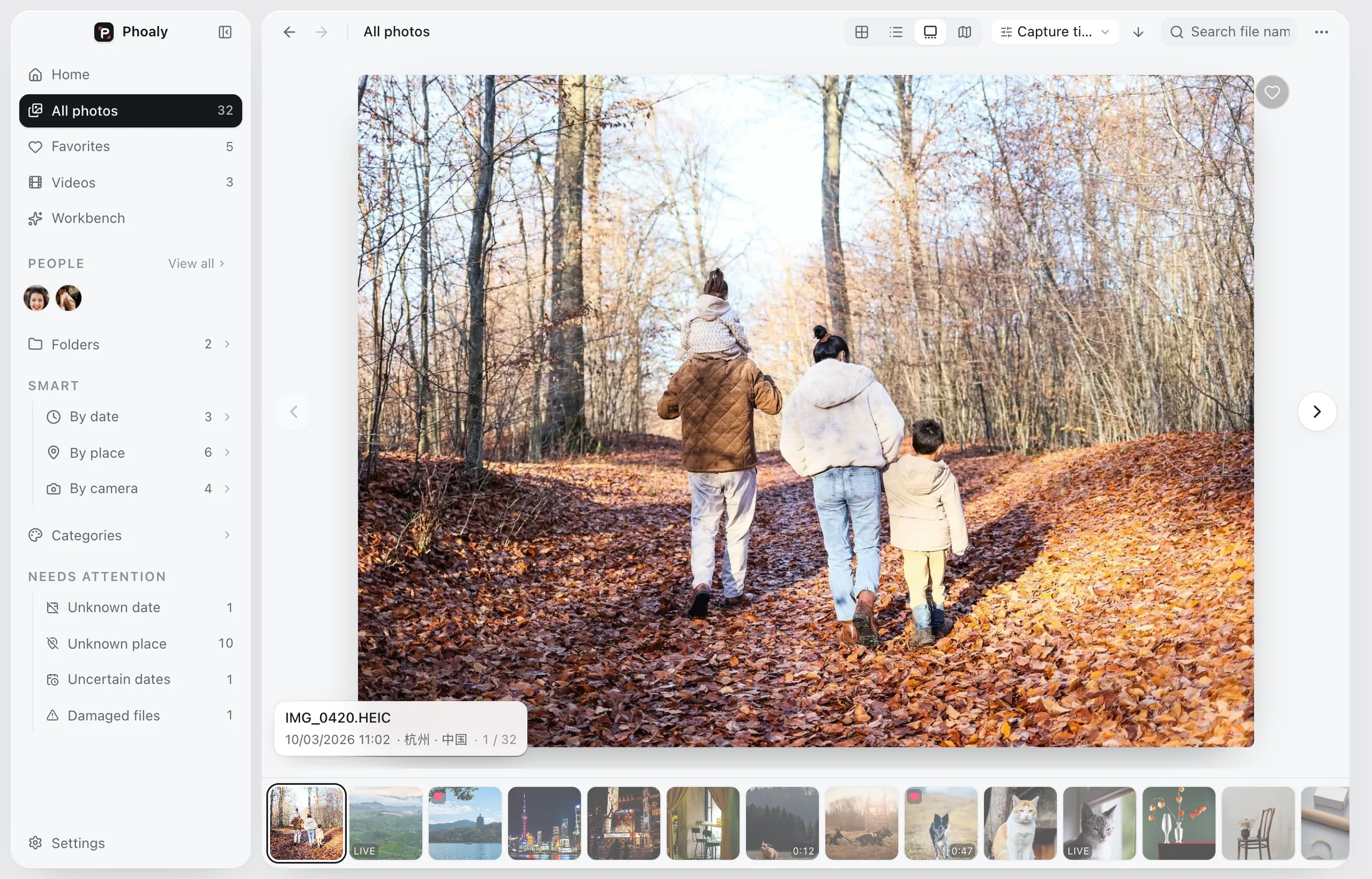
Gallery: a large frame above, a filmstrip below, arrow keys to keep moving.
- Adding a folder only builds an index; nothing is imported, copied, or moved
- Scan and preview are read-only; unplug a drive and its place is kept
- Grid, list, gallery, and filmstrip are virtualized; 100,000 items still scroll
- Search uses FTS5 trigram, so Chinese substrings and English fragments both match
- 100,000item benchmark
- 11.7 mssearch P95
- 4view modes
- 0uploads
08 / Privacy
Photos and picture understanding stay on this Mac.
Visual search, faces, and categories are all inferred locally. No account, no cloud sync, no telemetry. Network requests happen only for map tiles, license checks, and update checks; turn the map off or go offline and everything else keeps working.
Originals, thumbnails, EXIF, GPS, paths, face embeddings, and visual vectors stay on your Mac.
Buy, download, and activate without signing up. License recovery only needs an email.
Online tiles only send standard tile coordinates. A bundled offline world map is the fallback.
09 / Pricing
Buy once.
No subscription. No annual fee. Try every feature free for 30 days, then buy for one Mac or two.
No account needed. Download and start.
- Every feature for 30 days
- After that: some features are limited.
- No import, no upload; your originals stay untouched
- 2 Macs, with self-service deactivation
- Lifetime free updates
- Secure Stripe checkout, no sign-up
- Fully offline after activation
Digital goods. See the terms for the refund policy.
10 / Download
Download Phoaly
Download the current build, then drag Phoaly into Applications. Your index and settings carry over.
FAQ
Questions you may have.
Does visual search upload my photos?
No. The photo index and the text encoder both run on this Mac. Photos, thumbnails, vectors, and the sentence you type never leave it; the sentence is encoded locally and compared against the local index.
Which photo and video formats are supported?
JPEG, PNG, HEIC/HEIF, TIFF, WebP, BMP, and common RAW files (DNG/NEF/CR3/ARW/CR2 and more) can be browsed. Video uses system decoding for playback and covers, including Live Photo stills and motion clips. Rotate/crop write-back supports JPEG, PNG, and TIFF only.
How is it different from Photos or Lightroom?
Phoaly does not import photos or build its own library. It reads the folders you already have and focuses on folder browsing, visual search, people and scene categories, maps, batch organizing, and culling. RAW development and color editing are out of scope.
What if a person is grouped wrong?
Merge two people, split a few faces into a new person, rename, or assign and remove a face by hand. A manually assigned face is locked so a re-cluster leaves it alone, and each of these actions can be undone once.
What happens when I change Macs?
A license covers 1 or 2 Macs depending on the tier you bought. The license page lists the activated devices; release an old one there, then activate the new Mac.
What happens when the trial ends?
The trial lasts 30 days, followed by a 7-day grace period. After that the app becomes read-only: you can still browse, but the workbench, scanning, visual search, people management, and culling pause. Your originals and index are untouched.
What does “lifetime free updates” mean?
Buy once and every future version is included. New versions download and install inside the app; your existing index and settings are kept.